
A restore that exits 0 has answered one question
Last month's drill proved a backup could be restored. This one proved the data was right: an outside heartbeat so the backup monitor reports its own outage, then a restore test that compared the copy with live staging — every table by content hash, old encrypted customer data decrypted to the same digest, and the restored app giving byte-identical answers. Plus the 74 minutes I broke my own monitoring while testing it.
Last month I ended a post with a line I was quite pleased with: a backup nobody has restored is a hypothesis. Then I restored one, on a clean server, and logged in through a real browser two hours later.
That post also had a list at the bottom, the things the drill didn't prove:
- The snapshot was a day old, so it said nothing about how much data a real incident would lose.
- The database had no real customer data in it, so the encryption checks ran on test rows I added after the restore.
- I checked that the restore had the right number of rows. I never checked they were the right rows.
There was one gap I hadn't even listed. My backup monitor could tell me when a backup failed. Nothing would tell me if the monitor stopped.
This post is how I closed all four. It's written as the steps I actually followed, in order, including the one where I broke my own monitoring for 74 minutes while testing it.
Part one: who watches the watcher?
Step 1: list what each failure would look like
My backups are watched by a small Cloudflare Worker. Every 30 minutes the server reports each backup to it, and every 5 minutes it checks whether one is late, stuck or failed. If something is wrong, it emails me.
So I asked the obvious question about each piece: if this stopped, who would tell me?
| If this stops… | Who notices? |
|---|---|
| The backup job | The Worker, after 50 minutes without a success |
| The whole server | The Worker, same way |
| The Worker's own cron | Nobody. No code runs, so no email goes out |
| The email provider | Nobody. Alerts pile up in a database table |
A monitor can't report its own death. That's not a bug in my code; it's what a monitor is. Something outside it has to notice the silence.
Step 2: add a dead-man's switch
A dead-man's switch is a service that expects a ping every few minutes and emails you when the pings stop. I used healthchecks.io, which is free, and which runs on nothing I already depend on.
At the end of every check, the Worker now sends one of three signals:
- a success ping: the check ran, and every alert has been delivered;
- a
/failping: the check crashed, or an alert has been stuck for 15 minutes; - nothing at all: the cron stopped. healthchecks.io notices the silence by itself.
On healthchecks.io, the check gets a period of 5 minutes and a grace of 10. The code is a finally block, so the ping is sent whether the check succeeded or threw:
try {
  await evaluate(env, now);
  await deliver(env, now);
  if (await undeliveredAlerts(env, now)) failure = "Backup alert email undelivered";
} catch (error) {
  failure = "Scheduled backup check failed";
  throw error;
} finally {
  await heartbeat(env, failure); // logs its own errors, never throws
}
The ping function swallows its own errors on purpose. If healthchecks.io has a bad day, that must never break or hide the real check.
Step 3: make the secret impossible to store blank
The ping URL is effectively a password. Anyone who has it can send fake "all fine" pings. So it's stored as a Worker secret, and that's where I made my first mistake.
I ran wrangler secret put HEARTBEAT_URL and pressed Enter at the prompt without pasting anything. My second attempt pasted the URL into the name position instead, which quietly created a secret named after the URL. Neither produced an error.
What followed was worse than a crash. The Worker treats an empty URL as "heartbeat switched off" and says nothing. healthchecks.io said nothing either, because a brand-new check doesn't alert until it has received its first ping. Both sides looked healthy, and nothing was connected.
The fix is boring and reliable: pipe the value in, so the prompt can't receive a blank.
printf '%s' 'https://hc-ping.com/<check-uuid>' | wrangler secret put HEARTBEAT_URL
wrangler secret list   # check the *names* for typos like mine
Step 4: don't believe it until the first ping shows up
The rule I took from Step 3: a heartbeat isn't installed until you've seen its first ping arrive. Mine showed up as an HTTPS POST from a Cloudflare address with the body ok, which is exactly what the code sends.
Step 5: test the alert, but don't do what I did
A dead-man's switch you've never seen fire is still a hypothesis. To test it, I deployed the Worker with an empty cron list, planning to put the real schedule back after 15 minutes. Don't do this. Here's how it went:
| UTC | What happened |
|---|---|
| 17:08 | Deployed with no cron |
| 17:08–17:31 | Pings kept coming. The removal hadn't taken effect yet |
| 17:31 | Put the cron back, at almost the same moment the removal finally landed |
| 17:46 | healthchecks.io: down. The alert email arrived, so the test passed |
| 17:51–18:31 | Three attempts to restart the schedule. None worked |
| 18:42 | A full redeploy of the whole Worker |
| 18:45 | First ping. The "up" email arrived |
For 74 minutes, Cloudflare's API said the schedule was attached, and nothing ran. A failed backup would still have reached me, because every report from the server runs the same checks. But if the server had simply gone quiet, I'd have heard nothing.
What I learned:
- Cron changes can take more than 15 minutes to take effect, and a late removal can win over a re-add that came after it.
- If a cron is attached but not firing, redeploy the whole Worker. Pushing the trigger on its own did nothing, three times.
- Cloudflare's own run statistics lagged badly. Even after pings had resumed, they still showed no runs. The outside witness, healthchecks.io, was right the whole time.
The alert test now works the other way round: I silence the heartbeat, not the cron. Store an empty HEARTBEAT_URL, wait for the "down" email, pipe the real URL back. The backup checks never stop.
Part two: a restore test that checks the data
Step 6: write down what you're trying to prove
"The restore exited 0" answers one question: did the command finish? So before touching anything, I listed what last month's drill had left open and gave each item its own test:
| Question | How to answer it |
|---|---|
| How much data would a real restore lose? | Restore the newest snapshot. Under 60 min? |
| Is the schema exactly what the running release expects? | Prisma's drift check, against that release |
| Could the right row counts hide the wrong contents? | Hash every table's contents, live vs restored |
| Do timestamps survive, including across a clock change? | Compare raw epoch values |
| Does old encrypted data decrypt? | Decrypt rows written before the backup |
| Does the restored app behave like the real one? | Ask both the same questions |
| Do older backups still restore? | Restore the oldest one kept |
| Does the restore script refuse dangerous input? | Feed it some |
| Is the backup storage itself intact? | restic check --read-data |
Thirteen tests in all, numbered T0 to T12, and each one is there to answer one of these questions.
Step 7: create real encrypted data, the way customers do
An empty database can't prove that encrypted customer data survives a restore. So I made eight bookings through the public booking page, like a customer would, not by inserting rows. That way the real application encrypted them, and the real backup carried them off the server.
I used my own email aliases (confirmation emails really go out), one name with Hungarian accents to test text encoding, one rescheduled booking, one cancelled booking, and one appointment after 25 October, when Budapest leaves summer time.
Then I counted, and the numbers were wrong. Eight bookings had produced no new customers at all. The booking flow recognises a returning customer by email or phone, and I'd typed the same phone number every time. The product was right and my test data was lazy: give every fake customer their own phone number. Each booking keeps its own encrypted copy of the customer's name anyway, so I still had 17 old encrypted names to test against.
Step 8: move the secrets without ever seeing them
The restore needs seven secrets, all kept in a KeePassXC vault away from the server: the backup password, the storage address and keys, and the app's three encryption and authentication secrets.
I didn't want any of them on my screen, in shell history or in a log. So I ran one command per secret that pipes it straight from the vault, through SSH, into a file in the server's RAM that only root can read:
%KP% -a Password %DB% "Booking-and-more-Staging/Restic repository password" ^
  | ssh hetzner "umask 077; tr -d '\r\n' > /run/bam-drill/restic-password"
Then I checked each one by hash against what staging actually runs. All seven matched. One file came out empty on the first try: the password lived in a vault entry my first listing hadn't shown. The size check caught it immediately (0 bytes).
Step 9: stay out of the backup's way
Every half hour, the backup finishes by pruning old snapshots, and that needs exclusive access to the storage. Any read at that moment makes the real backup fail, and my brand-new monitoring would email me about a failure my own test had caused.
So every step that read from backup storage started between :05 and :25, or :35 and :55. A small rule that cost nothing, and the next backup ran perfectly.
Step 10: fingerprint the live database first
Straight after the 15:00 backup, I took a read-only fingerprint of live staging. For every table it records the number of rows and a hash of all their contents. It also records the migrations, every constraint and index, and every booking's start and end time as a raw number.
It also recorded when each table was last written: nothing after 15:00. So live staging and the snapshot were identical, and any difference I found later would be a real problem rather than something to explain away.
Step 11: restore into a sealed box
The target was a fresh PostgreSQL container built from the exact image staging runs, on a Docker network with no way out and no open ports. The existing restore script streamed the snapshot from storage straight into PostgreSQL, so no unencrypted copy ever touched the disk:
T2 start 15:35:00.106Z
Restore completed in 6s
T2 end   15:35:06.302Z    exit=0
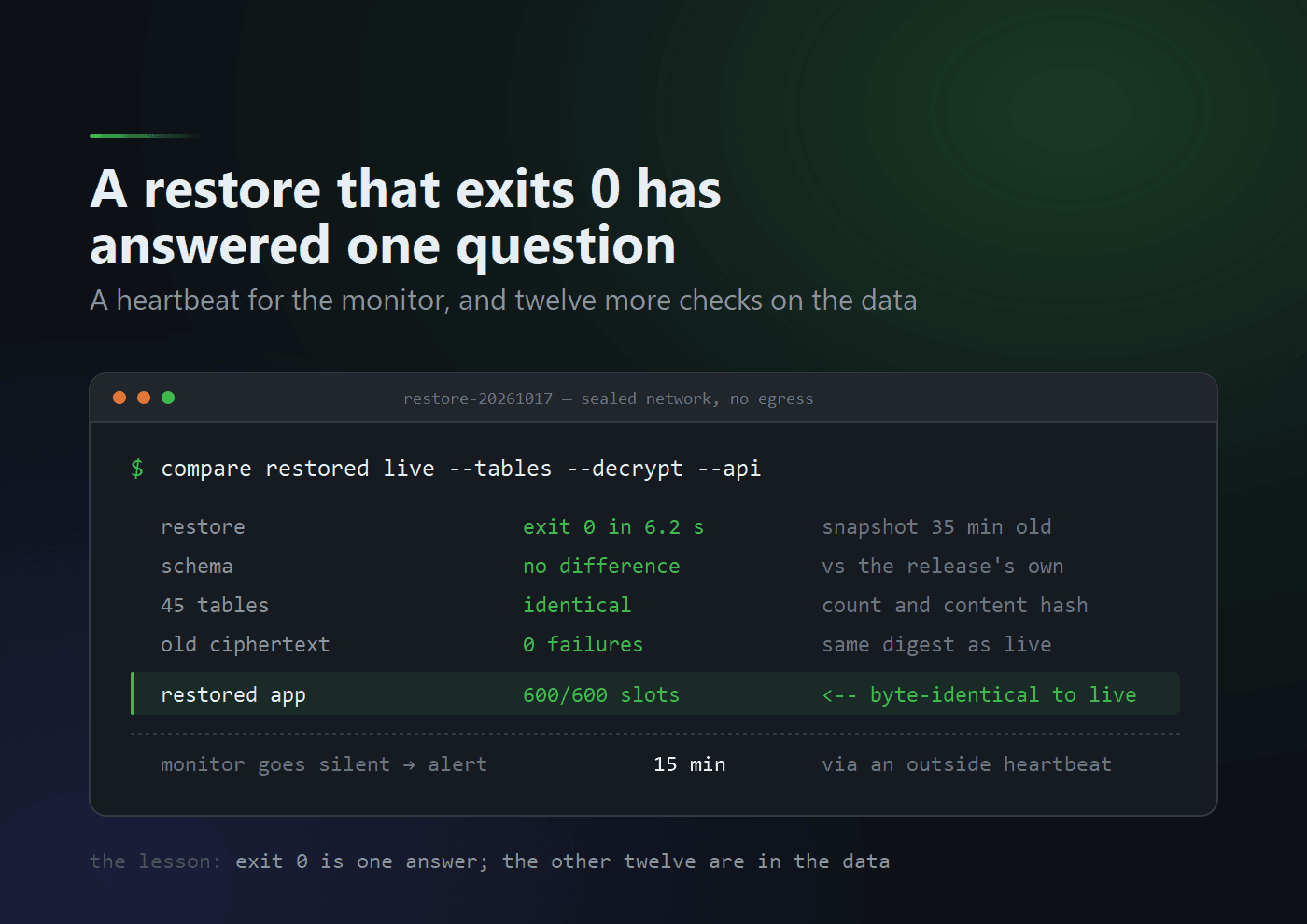
That's 6.2 seconds for the restore, from a snapshot taken 35 minutes earlier. That 35 minutes is the honest version of "how much would I lose?" Last month I couldn't answer it at all.
Step 12: compare the schema with the release, not with my memory
Prisma has a command that compares a live database with what the code expects. I ran it from a throwaway copy of the staging application image, so it used the schema that release actually ships:
prisma migrate diff --from-config-datasource --to-schema ./prisma/schema.prisma
No difference detected.
The constraint and index fingerprints matched too, including the two constraints that make double-booking impossible at the database level.
Step 13: compare the data itself
I ran the Step 10 fingerprint again on the restored copy:
all 45 tables identical (count and md5)
all 17 bookings' start/end epochs identical
  12 before the clock change, 5 after
Why raw numbers for the times? A restore that shifted every time by an hour would still look right when the application reads it back, because the error cancels out on the way in and on the way out. Comparing the raw values inside the database is what would catch it. They were identical.
Step 14: decrypt the old data, and compare it with live
This is the check last month's drill couldn't do. A throwaway container with no network at all received the restored encrypted rows and decrypted every one with the vault keys. It also recalculated the search hashes and tried a random wrong key. It printed only counts, plus one hash over everything it decrypted:
{"customers": {"customers": 2, "failed": 0, "emailIndexOk": 2, "phoneIndexOk": 1},
 "bookings":  {"snapshots": 17, "failed": 0, "accented": 10},
 "wrongKeyAccepted": 0, "plaintextDigest": "cc8ba4ef…"}
Then I ran the same script against live staging, and got the same digest. The restore decrypts to exactly what live staging holds, accents included, and not a single name or address was ever printed.
Step 15: run the app on the restore, and ask both the same questions
Finally I started the real application on the restored data, with:
- the vault secrets;
- an empty Redis;
- every outside service (email, payments, invoicing, AI) removed.
A quick probe confirmed nothing could get out (network unreachable), and the health check came back green.
Getting there took two tries. The first start refused, because I'd removed the email key but left its sender address behind. The app's configuration check correctly said "these go together". Removing a credential means removing everything that depends on it.
Then I sent the same public requests to the restored app and to live staging, and compared hashes of the answers:
| Request | Restored | Live |
|---|---|---|
| The organization's public page | a147855d… | a147855d… |
| Its services | 7ba2035d… | 7ba2035d… |
| Its providers | 649a336b… | 649a336b… |
| Free slots, 19–30 October | 600 slots, 0df3e2b4… | 600 slots, 0df3e2b4… |
The slot search is the result I trust most. It runs the real availability logic, and the restored bookings blocked exactly the same times as the live ones, across the clock change.
Step 16: the oldest backup, the refusals, and a full read
Three quick checks to finish:
- The oldest backup kept, from 21 September, restored in 4 seconds. It matched what I'd recorded about it at the time. The retention pattern was right too: every snapshot for a week, then exactly one per day.
- The restore script's refusals all held:
- a database name without the agreed prefix is refused before anything is read;
- a wrong password fails;
- restoring over an existing database stops at once and changes nothing.
- A full read of the backup storage, every byte of it, finished in 14 seconds:
no errors were found.
Step 17: prove you left nothing behind
Everything the test created carried one label, so cleaning up meant deleting by that label, then checking:
left: containers=0 volumes=0 networks=0
/run/bam-drill removed     (all seven secrets)
dump/sql files written in the last 2h: 0
The 16:00 backup ran normally, and the heartbeat had sent nothing but ok throughout. The test hadn't disturbed anything it was testing.
Step 18: make it happen again
A drill that only works once is just a nice afternoon. So:
- the three refusals became automated tests that run on every push;
- the results and the lessons went next to the plan;
- next month's run went in my calendar.
What I can say now, and what I still can't
I can now say:
- My monitor tells me when it dies.
- A restore loses about half an hour of data and takes about six seconds.
- The restored schema is exactly what the release expects.
- Every table is identical, by content and not just by count.
- Old encrypted customer data decrypts to the same values as live.
- The restored application answers exactly like the real one.
I still can't say these, and I'd rather list them than let a table of ticks hide them:
- Only two customers were tested, because of my shared phone number. The booking-level data was much broader, but the customer-level checks were thin.
- No staff login was tested against the restore. I compared it through the public API only.
- The four-hour total wasn't re-measured. Last month's clean-server drill is still the evidence for that.
- This is staging. Production gets its own run, against its own backups.
Last month's lesson was that a backup nobody has restored is a hypothesis. This month's: a restore that exits 0 has answered one question. The other twelve took most of an afternoon, and that's exactly where the problems would have been.