
Sunshine Dental
User Guide
A plain-English guide to what this app does and how your clinic uses it every day.
What is this, in one sentence?
It's a 24/7 AI receptionist for your dental clinic — chatting with patients on your website — plus a simple dashboard your team uses to manage the calendar, patients and conversations — all in one place.
Think of it as hiring a tireless front-desk assistant who never sleeps, never takes a lunch break, and never leaves a question unanswered — working alongside a clean, modern admin screen for your staff.
The two parts of the app
1. The Chat Receptionist 💬
The AI receptionist lives on your website as a text chat. It greets visitors, has a natural conversation, and works from your live calendar — in the patient's own language (switchable right in the chat header). It can:
- Answer common questions ("What are your hours?", "Where are you located?", "Do you take walk-ins?")
- Book appointments — it checks who's available, offers real open time slots, and reserves the spot
- Cancel or reschedule existing appointments
- Take down new patient details (name, phone, reason for visit)
- Handle callback requests when a human needs to follow up
- Speak more than one language, so you can serve a wider community
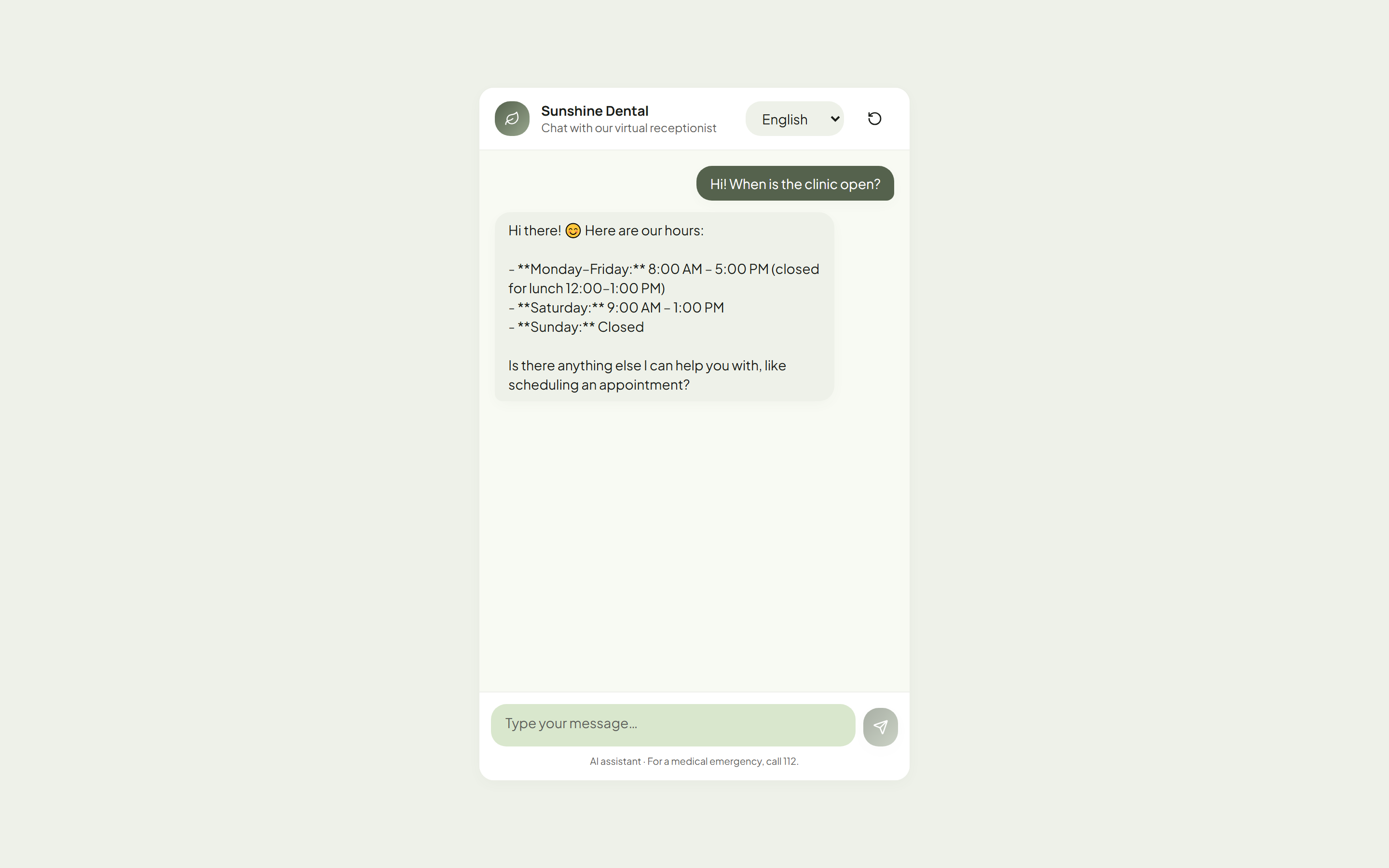
The key point: it works around the clock. A patient with a toothache at 9 PM on a Sunday can still book an appointment for Monday morning — no missed messages, no unanswered contact form, no lost business.
A few more things worth knowing:
- It always asks for an email before booking, so every booking gets a confirmation email automatically — nothing is left unconfirmed.
- Patients can install it like an app on their phone (one tap from the browser) — your clinic gets its own icon on their home screen, with no app store involved.
- Every conversation is summarized and logged for your staff (see Chat Logs below).
2. The Staff Dashboard 💻
This is the web screen your team logs into. It's where the humans stay in control of everything the AI does. From here, staff can see every appointment, manage the calendar, look up patients, and review every conversation the receptionist had.
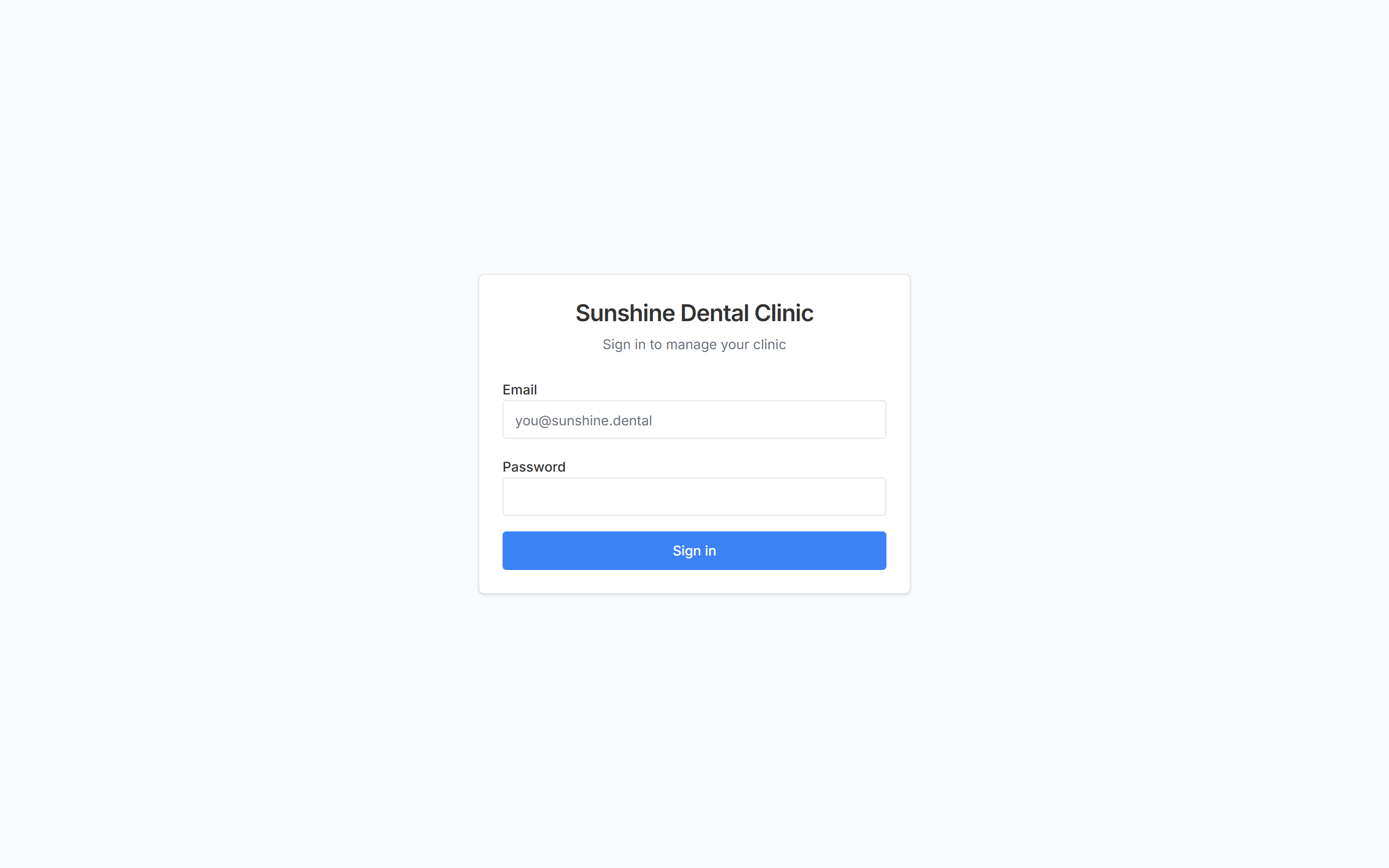
Staff sign in with their own email and password:
How it all fits together
The AI receptionist and your staff dashboard share one calendar and one patient list — so everything stays in sync automatically. The AI handles the conversations; your team supervises from the dashboard.
flowchart LR
Chat([💬 Patient chats]) --> AI[🤖 AI Receptionist]
AI <--> Core[(📅 Shared Calendar<br/>👥 Patient Records<br/>💬 Chat Logs)]
Staff([👩⚕️ Your Staff]) --> Dashboard[💻 Staff Dashboard]
Dashboard <--> Core
What happens in a conversation
Here's the journey of a single chat — from "hello" to booked appointment:
flowchart TD
    Start([💬 Patient opens the chat]) --> Answer[🤖 AI replies instantly]
    Answer --> Intent{What does the<br/>patient need?}

    Intent -->|Book appointment| Check[Check live calendar<br/>for open slots]
    Check --> Offer[Offer real available times]
    Offer --> Book[✅ Reserve the slot]
    Book --> Capture[Save patient details<br/>+ email confirmation]

    Intent -->|Cancel / reschedule| Find[Find existing appointment]
    Find --> Update[✅ Update the calendar]

    Intent -->|Question / hours / location| Answer2[💬 Answer instantly]

    Intent -->|Needs a human| Callback[📝 Log a callback request]

    Capture --> Log[💬 Record conversation summary,<br/>transcript & sentiment]
    Update --> Log
    Answer2 --> Log
    Callback --> Log
    Log --> Done([Everything appears in<br/>the staff dashboard])
What your team can do in the dashboard
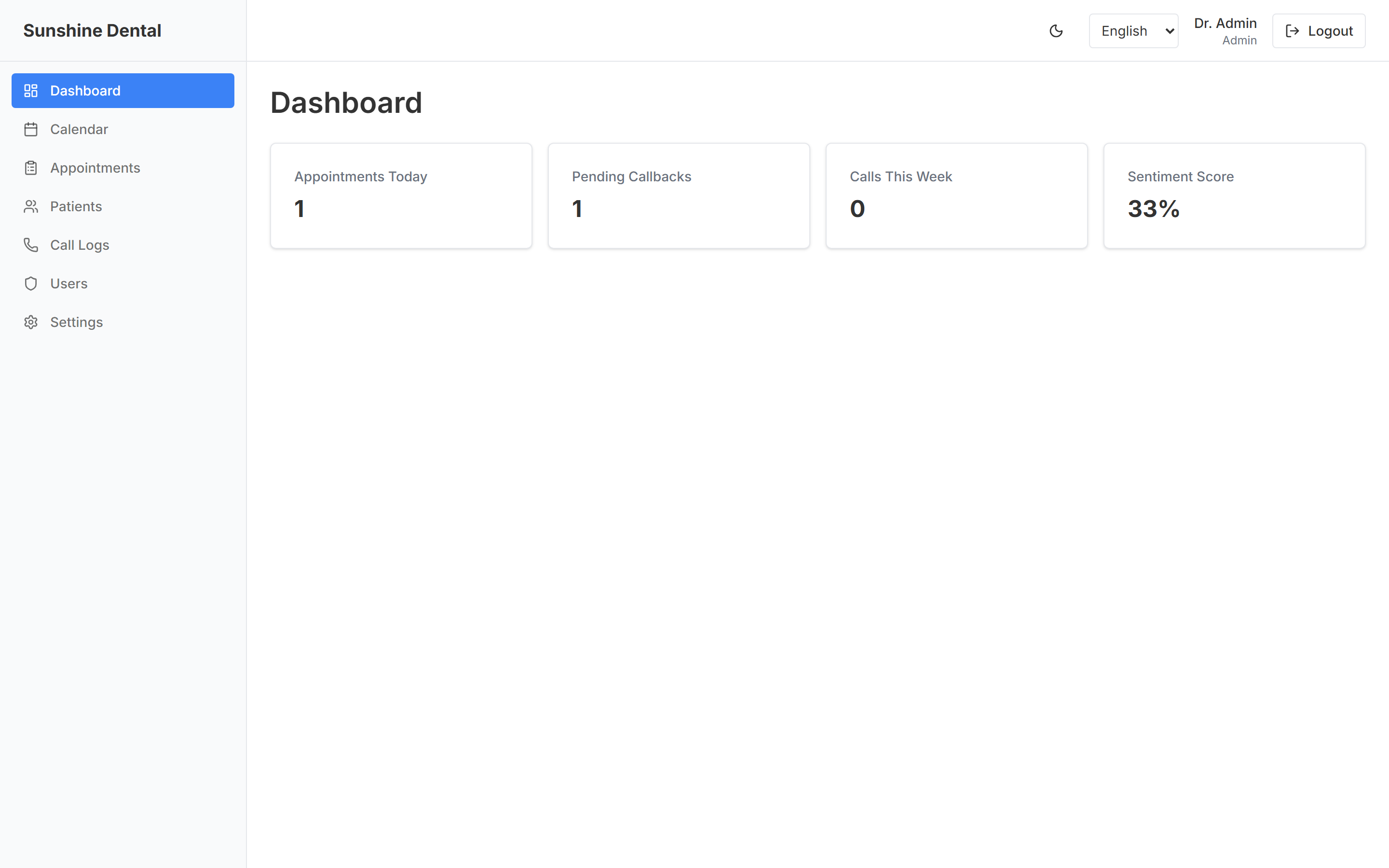
📊 Dashboard (home screen)
A quick "how are we doing today" overview — today's appointments, patients waiting for a callback, how many chats came in this week, and how happy patients sounded.
📅 Calendar
The heart of the app. A visual weekly/daily/monthly calendar showing all appointments and each dentist's working hours.
- Set working hours — mark when each provider is available for bookings
- Block off time — lunch breaks, meetings, admin time
- Mark vacations — time off, so nothing gets booked while a dentist is away
- Book, move, or cancel appointments with simple clicks and drag-and-drop
- See all providers side-by-side so the front desk can manage the whole clinic at a glance
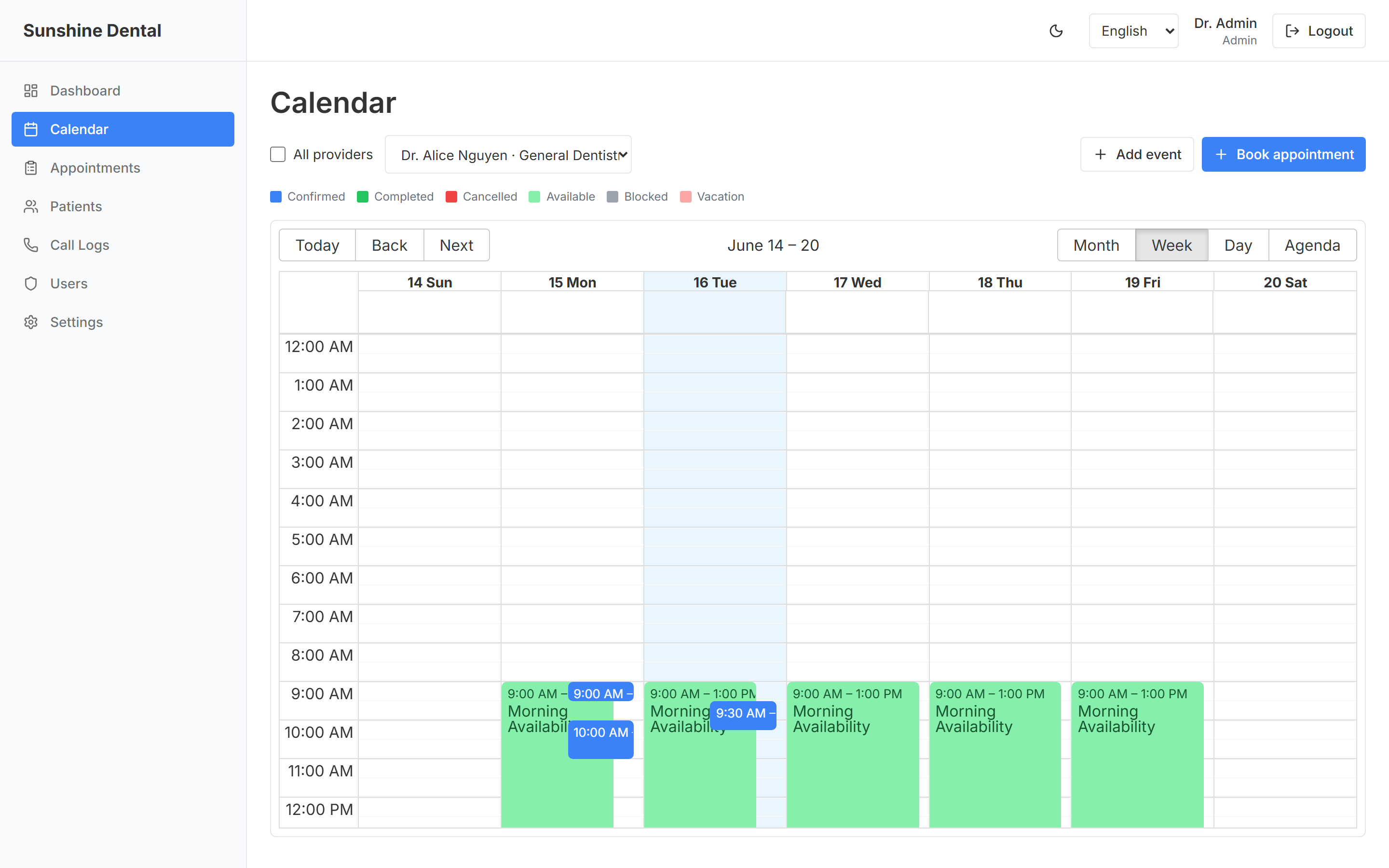
The AI receptionist reads from this same calendar — so it only ever offers time slots that are genuinely free. No double-bookings.
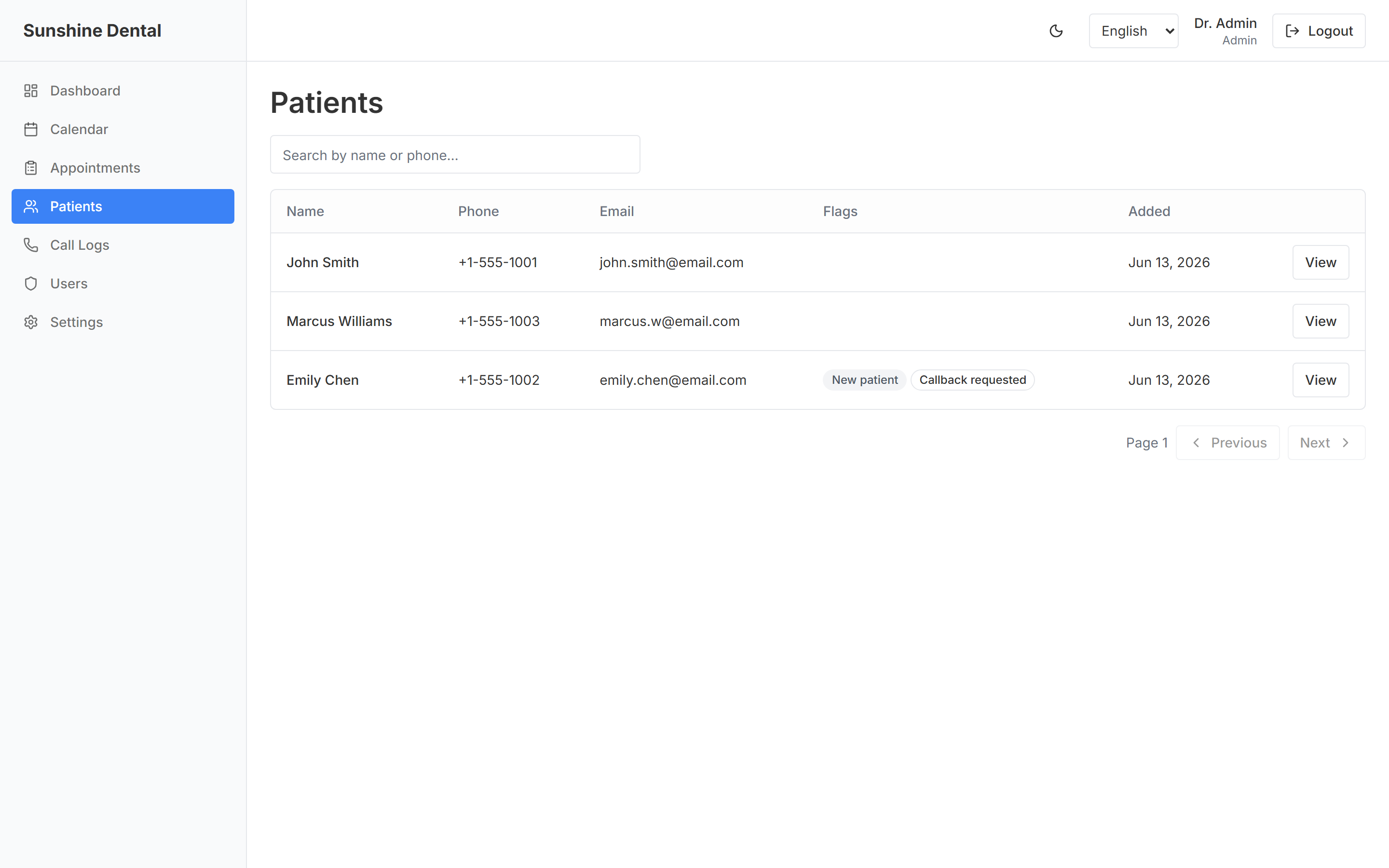
👥 Patients
A simple address book of everyone who's contacted the clinic. The AI automatically adds new patients here, and staff can search, view history, and update details.
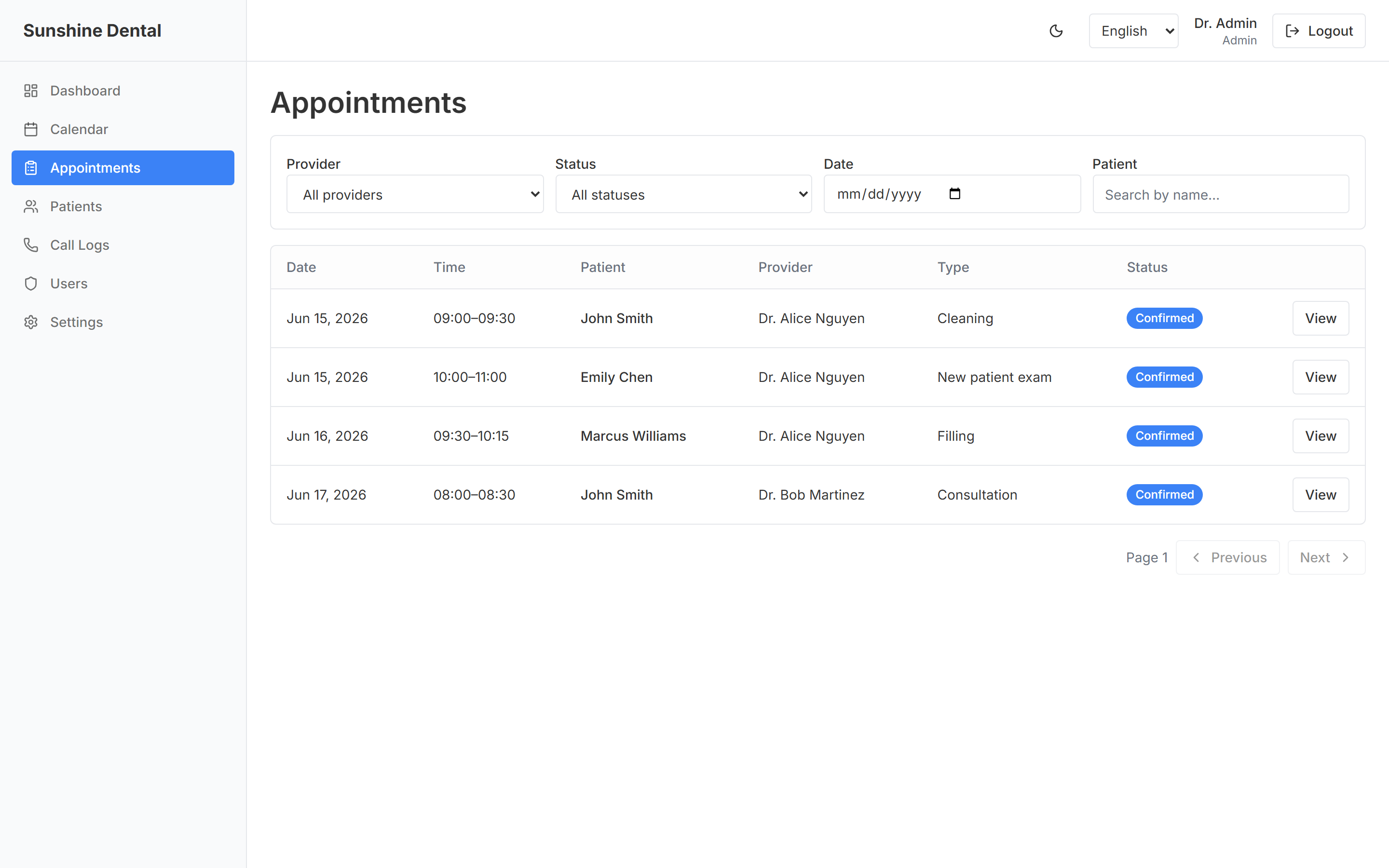
📋 Appointments
A clean list of every appointment — upcoming, completed, or cancelled. Filter by day, by dentist, or by patient. Mark visits as completed when they're done.
💬 Chat Logs
A record of every conversation the AI handled, including:
- A written summary of what it was about, in the patient's language
- The full transcript (word-for-word) if you want the details
- The language the patient used and how many messages it took
- How the patient seemed to feel (positive / neutral / unhappy)
- Whether the conversation was successful
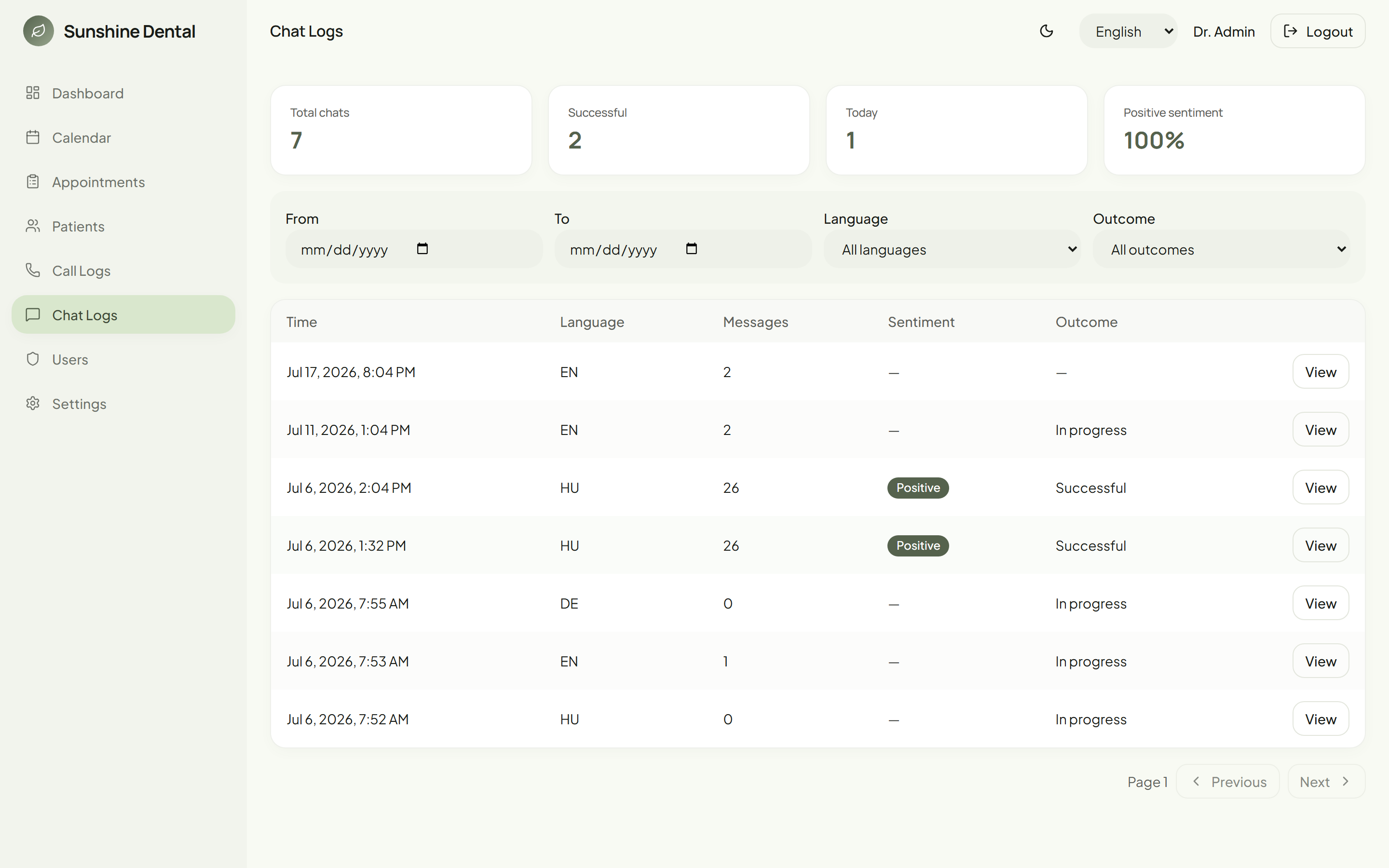
This is your quality-control window — you can always see exactly what the AI said and did.
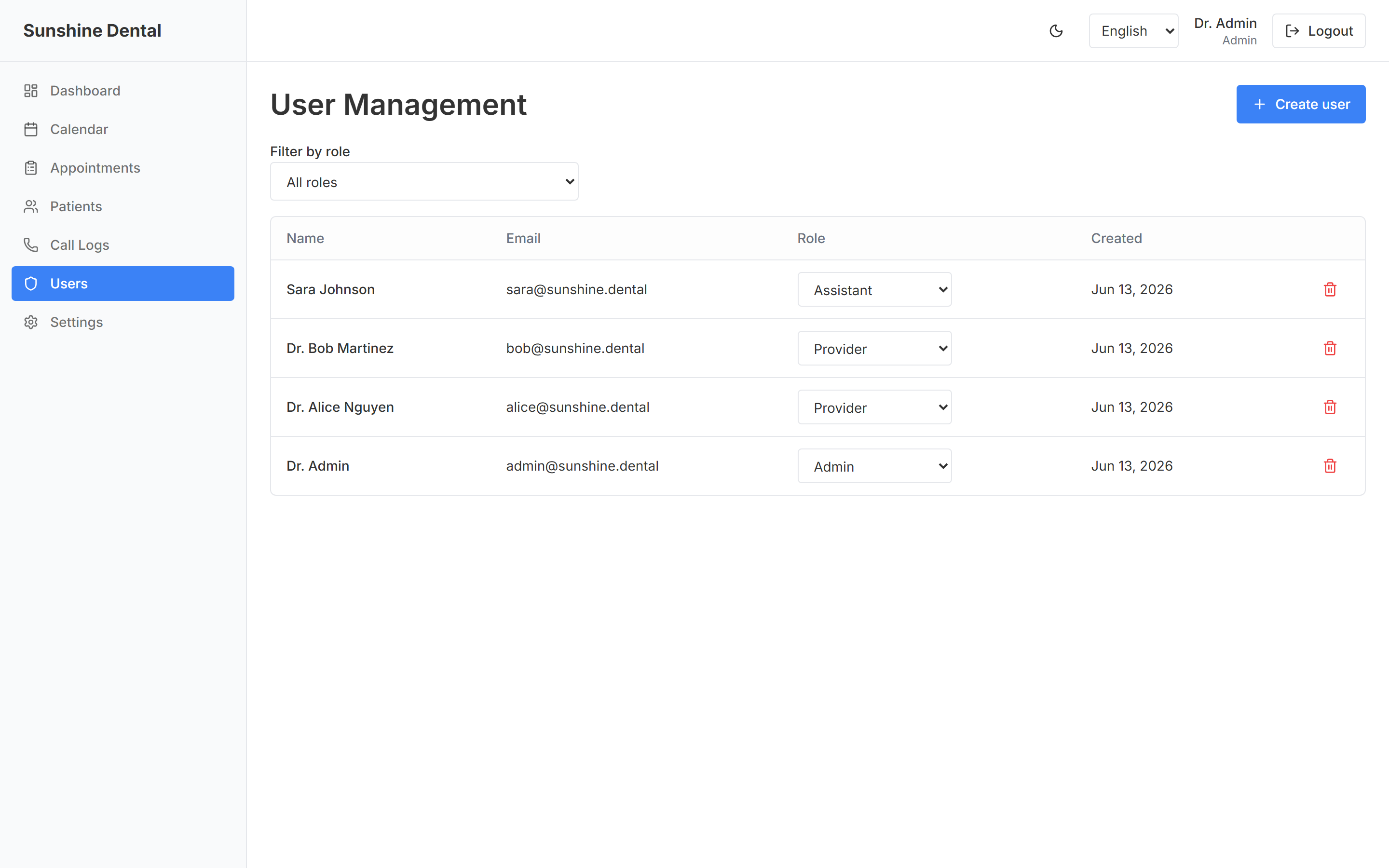
👤 Users (Admins)
Owners and managers manage their team here — creating staff accounts and setting each person's role.
⚙️ Settings
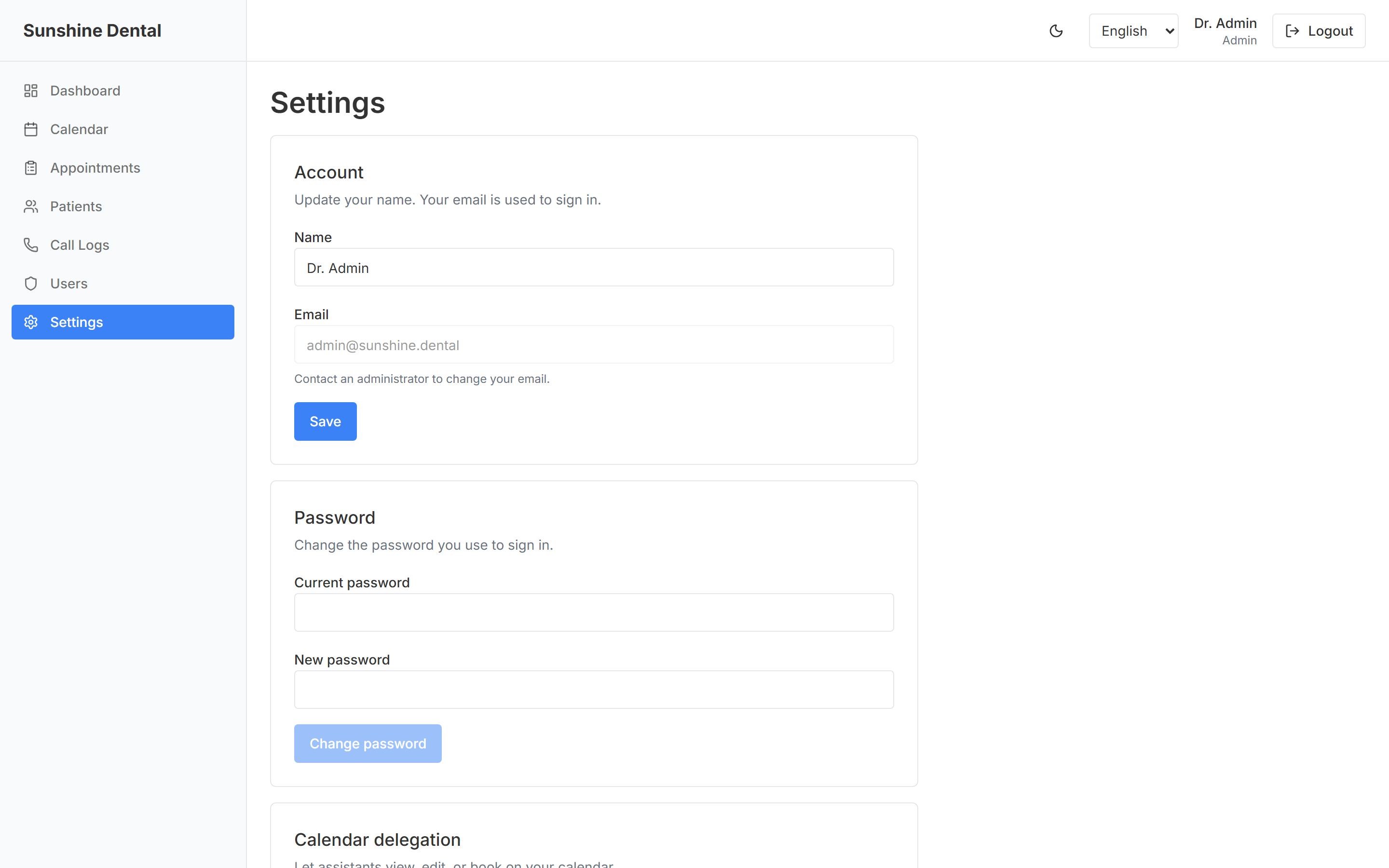
Personal account preferences — update your name, change your password, and (for dentists) delegate your calendar to an assistant. Language and light/dark theme are toggled any time from the top bar.
Who uses what (roles)
Different staff members see different things, so everyone gets exactly the access they need:
| Role | What they do |
|---|---|
| Provider (Dentist) | Manages their own calendar and availability, sees their own appointments, marks visits complete |
| Assistant (Front desk) | Manages the whole clinic — all calendars, all appointments, patient records, and chat logs |
| Admin (Owner / Manager) | Everything above, plus creating staff accounts and managing the team |
A dentist can also delegate their calendar to an assistant — letting the front desk manage their schedule on their behalf.
A day in the life
8:55 PM, after hours. A patient with a chipped tooth opens the chat on your website. The AI answers, finds the next available emergency slot tomorrow at 9:00 AM with Dr. Nagy, books it, takes the patient's name, phone and email, and sends a confirmation. No human involved.
9:05 AM, next morning. The front desk assistant logs in. The dashboard already shows the new 9:00 AM appointment on the calendar and the new patient in the system. She reads the conversation summary, sees everything is in order, and gets the room ready.
Throughout the day. Patients message to reschedule, ask about hours, or request callbacks. The AI handles the routine ones; anything unusual is logged for staff to follow up. The team spends its time on patients in the chair — not stuck on the phone.
Why clinics love it
- Never miss an enquiry — every message is answered, even nights, weekends, and holidays
- No more phone tag — patients book themselves, instantly, without waiting on hold
- Fewer no-shows — appointments are confirmed by email the moment they're made
- Free up your front desk — staff focus on in-person patients instead of the phone
- Full transparency — every conversation is summarized and recorded, so you're always in control
- Speaks your patients' languages — serve more of your community, in writing they can re-read
- Always on your website — patients book from the page they're already on, on any device
- Patient data stays truly private — encrypted with a key only your clinic holds, and backed up every night
- One simple system — calendar, patients and conversations all in one place (no more juggling spreadsheets and separate calendars)
🔐 How your patients' data is protected
Patient records are medical data, and this app treats them that way — with protections you can explain to a patient in one breath.
Encrypted, with a key only your clinic holds
All patient personal data (names, phone numbers, appointment notes, chat transcripts) is stored encrypted with AES-256 — the same encryption family used in online banking. The encryption key belongs to your clinic alone: it is never stored on the server and never held by us. Practically, that means someone who stole the database — or even the server's disks — would see only unreadable ciphertext.
There's a visible, everyday side to this: whenever the system restarts (for example after an update), it comes back locked. Staff can still log in and see the calendar, but patient names show as •••• until an administrator enters the clinic's key — a 10-second routine:
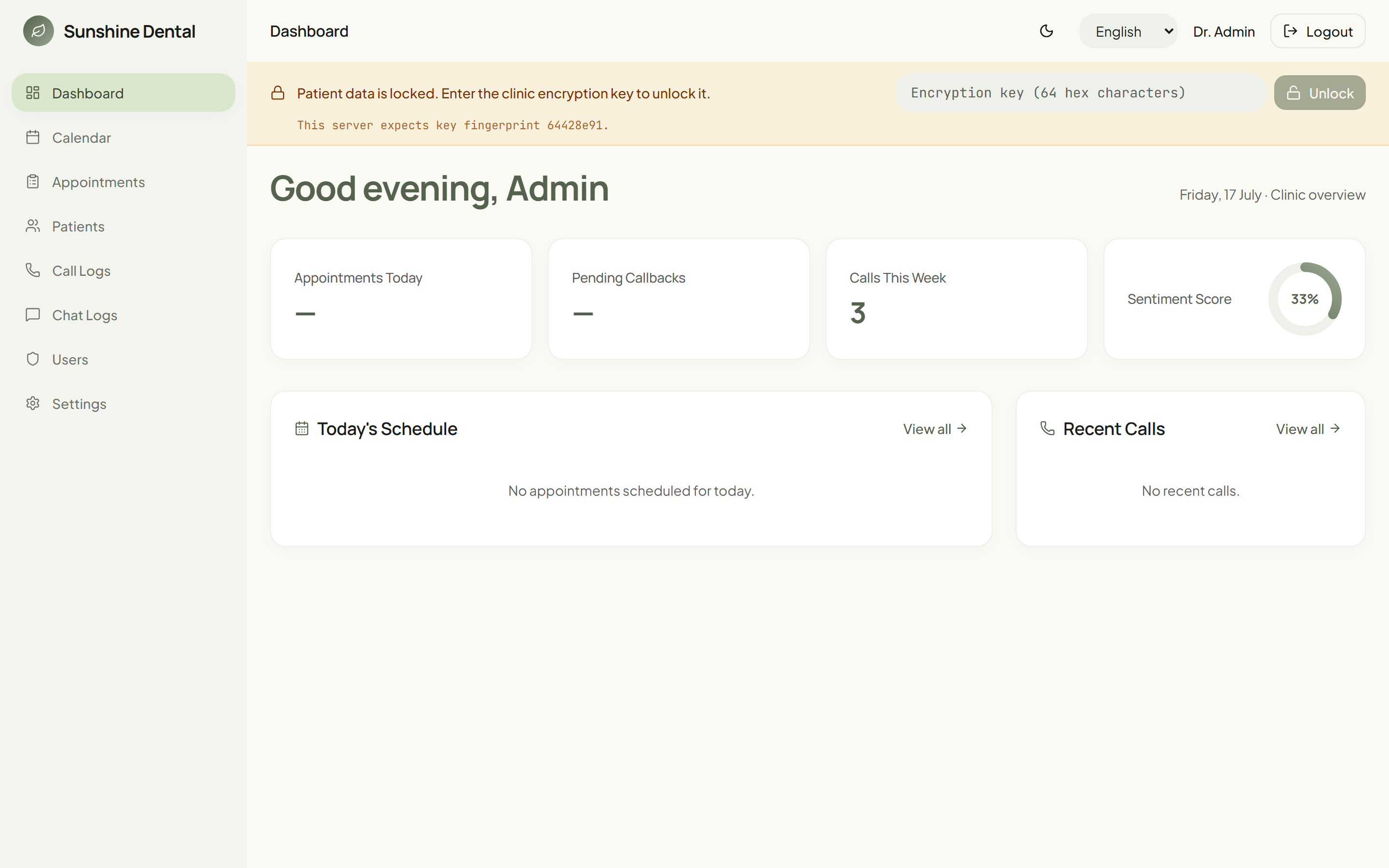
The banner even shows a short "fingerprint" of the expected key, so the admin can tell at a glance they're about to use the right one — without the key itself ever being displayed.
Backed up every night — in a form even we can't read
Every night at 3 AM the system automatically backs up the entire database, encrypts the backup, and keeps 90 days of history. The clever part: backups are encrypted with a method where the server can create them but can never read them back — only your clinic's sealed recovery key (a printed document kept in the clinic safe) can open a backup.
- If the server is ever lost (hardware failure, disaster), the newest backup is restored and unlocked with your usual key. This restore procedure isn't theoretical — it's rehearsed with regular fire drills.
- If the clinic ever loses its key, the sealed recovery document in your safe can recover it. No data loss, no calling the vendor to ask for a copy — we never had one.
- And if both were lost? Then the data is unrecoverable — by design. That's not a flaw; it's the proof that nobody outside your clinic can ever read your patients' records.
Under the hood — how it's deployed
For the technically curious: here's the actual system behind the friendly front desk. The whole product runs as a small set of Docker containers on a single Hetzner VPS (managed with Coolify, which also terminates HTTPS at the edge), talking to two specialised cloud services for chat and email.
flowchart TB
    browser(["🌐 Patient & Staff browser"]) -->|HTTPS| web

    subgraph vps["🖥️ Hetzner VPS — Coolify + Traefik (TLS)"]
        direction TB
        web["📦 web · nginx + Vite/React SPA<br/>serves UI, reverse-proxies /api"]
        api["📦 api · Fastify + Prisma + better-auth<br/>PII encrypted AES-256-GCM"]
        db[("📦 db · PostgreSQL 17")]
        backup["📦 backup · nightly pg_dump + age"]
        web -->|"HTTP :3000"| api
        api -->|"TCP :5432"| db
        backup -->|"TCP :5432"| db
    end

    subgraph cloud["☁️ External cloud services"]
        anthropic["💬 Anthropic · Claude Haiku 4.5"]
        n8n["🔀 n8n · confirmation-email workflow"]
        gmail["✉️ Gmail · OAuth2 email"]
    end

    api -->|"HTTPS (chat)"| anthropic
    api -->|"HTTPS webhook (booking)"| n8n
    n8n -->|OAuth2| gmail
    backup -.->|age-encrypted offsite| storagebox[("🗄️ Hetzner Storage Box")]
- Hetzner VPS (Coolify + Traefik) — one Docker stack with TLS at the edge. The very same stack is deployed twice, as fully separate production (
sunshine.appointer.hu) and staging (sunshinedev.appointer.hu) environments. web/api/db/backupcontainers — nginx serves the React single-page app and reverse-proxies/api; a Fastify API holds the business logic; an in-stack PostgreSQL 17 database stores everything; and a nightly job takes an encrypted backup.- Anthropic Claude Haiku 4.5 — the receptionist. The API talks to Claude directly and runs the booking tools in-process against the same calendar the dashboard uses, so there is no workflow hop between a patient asking for a slot and the calendar answering.
- n8n → Gmail (OAuth2) — booking confirmations and error alerts. This is the only thing left outside the stack, and it only sends mail; nothing in the booking path depends on it being up.
- Encrypted, clinic-held keys — patient data is encrypted with a key only the clinic holds, and the nightly backups are sealed with a separate offsite key (see How your patients' data is protected above).
Frequently asked questions
Does the AI replace my staff? No — it handles the repetitive front-desk work so your team can focus on patients. Your staff stays fully in control through the dashboard.
What if the AI can't handle a request? It records it (including callback requests) so a human can follow up. You see everything in the Chat Logs.
Can I see what the AI told a patient? Yes. Every conversation has a full written transcript and summary in the Chat Logs.
What about patients who would rather phone us? They call your normal clinic line and reach your team, exactly as before — the app doesn't sit in front of your phone. The chat is there to absorb the enquiries that would otherwise become voicemails, missed calls or contact-form emails.
Will it double-book us? No. The AI books only from your live calendar, so it only offers slots that are actually free.
Is patient information kept private? Yes, on several levels. Access is restricted by role and password. Beyond that, all patient personal data is stored encrypted, and the encryption key is held only by your clinic — not by us, not on the server. Nightly backups are encrypted the same way. See "How your patients' data is protected" above.
What happens if the AI chat can't help, or the system is being updated? The chat politely says it's temporarily unavailable and points patients to your clinic phone number. Staff-side, updates briefly "lock" patient data until an admin re-enters the clinic key — the calendar keeps working throughout.
Questions or want a walkthrough? Get in touch — we're happy to give you a live demo.